Today, we’re announcing that MCP Apps are now live as an official MCP extension. Tools can now return interactive UI components that render directly in the conversation: dashboards, forms, visualizations, multi-step workflows, and more. This is the first official MCP extension, and it’s ready for production.
We proposed MCP Apps last November, building on the amazing work of MCP-UI and the OpenAI Apps SDK. We were excited to partner with both OpenAI and MCP-UI to create a shared open standard for providing affordances for developers to include UI components in their MCP clients.
Since then, the spec has been refined, the SDK has matured, and clients like ChatGPT, Claude, Goose and Visual Studio Code have shipped support for this capability, with more clients coming soon.
Get Started with MCP AppsWhat Are MCP Apps?
MCP Apps let tools return rich, interactive interfaces instead of plain text. When a tool declares a UI resource, the host renders it in a sandboxed iframe, and users interact with it directly in the conversation.
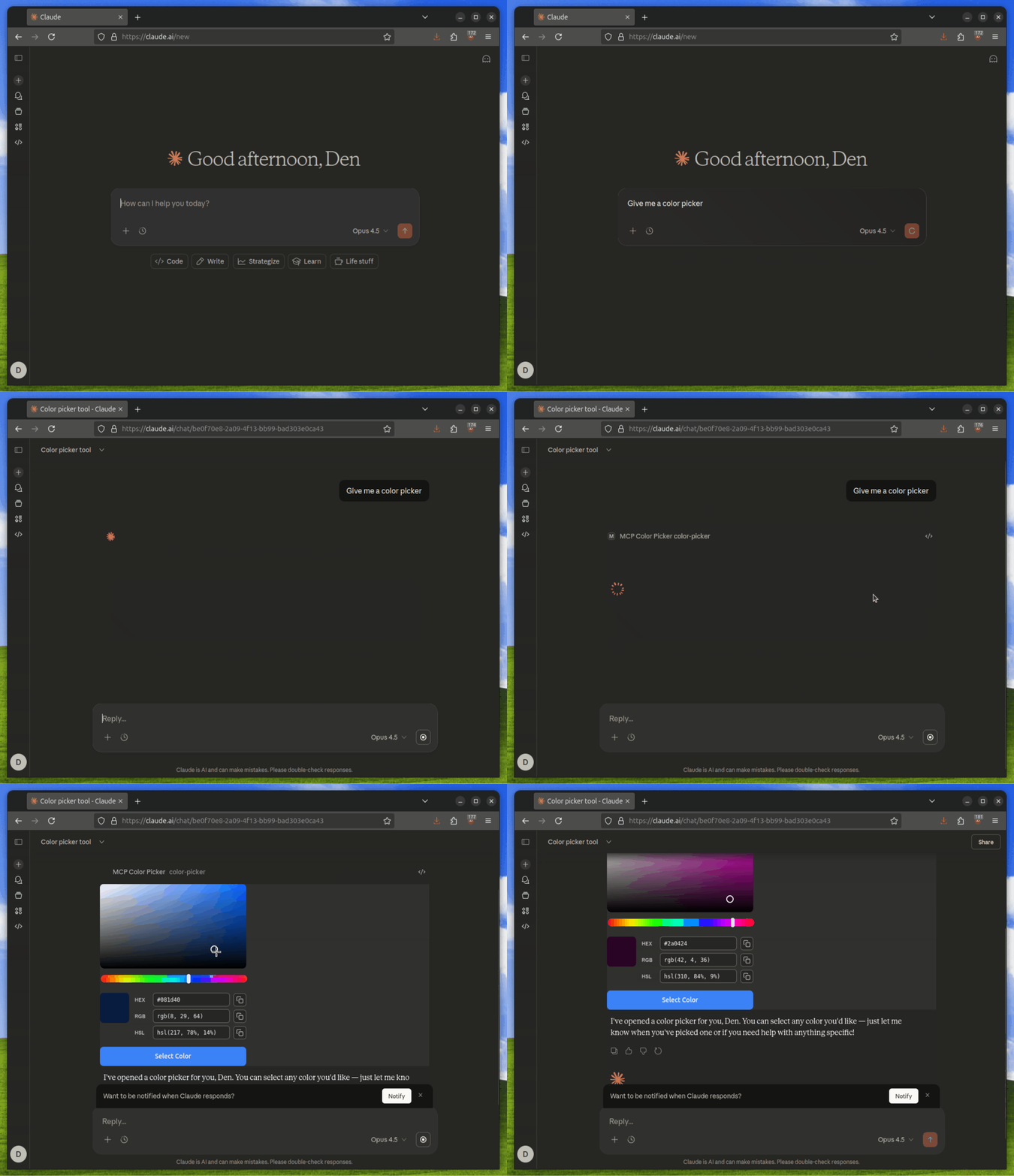
Here are a few scenarios where MCP Apps shine:
- Data exploration: A sales analytics tool returns an interactive dashboard. Users filter by region, drill down into specific accounts, and export reports without leaving the conversation.
- Configuration wizards: A deployment tool presents a form with dependent fields. Selecting “production” reveals additional security options; selecting “staging” shows different defaults.
- Document review: A contract analysis tool displays the PDF inline with highlighted clauses. Users click to approve or flag sections, and the model sees their decisions in real time.
- Real-time monitoring: A server health tool shows live metrics that update as systems change. No need to re-run the tool to see current status.
These interactions would be less smooth as text exchanges, whereas MCP Apps make them natural - it’s like using any other UI-based web app.
How It Works
The architecture of MCP Apps relies on two key MCP primitives:
- Tools with UI metadata: Tools include a
_meta.ui.resourceUrifield pointing to a UI resource - UI Resources: Server-side resources served via the
ui://scheme containing bundled HTML/JavaScript
// Tool with UI metadata
{
  name: "visualize_data",
  description: "Visualize data as an interactive chart",
  inputSchema: { /* ... */ },
  _meta: {
    ui: {
      resourceUri: "ui://charts/interactive"
    }
  }
}
The host fetches the resource, renders it in a sandboxed iframe, and enables bidirectional
communication via JSON-RPC over postMessage.
Why MCP Apps?
MCP is great for connecting models to data and giving them the ability to take actions. But there’s still a context gap between what tools can do and what users can see.
Consider a tool that queries your database. It returns rows of data, maybe hundreds of them. The model can summarize this data, but users often want to explore: sort by a column, filter to a date range, or click into a specific record. With text responses, every interaction requires another prompt. “Show me just the ones from last week.” “Sort by revenue.” “What’s the detail on row 47?” It works, but it’s slow.
MCP Apps closes this gap. The model stays in the loop, seeing what users do and responding accordingly, but the UI handles what text can’t: live updates, native media viewers, persistent states, and direct manipulation. Combined, they provide the model and user with all the context they need in one familiar interface.
The App API
To build new MCP Apps, developers can use the
@modelcontextprotocol/ext-apps
package, which provides an App class for UI-to-host communication:
import { App } from "@modelcontextprotocol/ext-apps";

const app = new App();
await app.connect();

// Receive tool results from the host
app.ontoolresult = (result) => {
  renderChart(result.data);
};

// Call server tools from the UI
const response = await app.callServerTool({
  name: "fetch_details",
  arguments: { id: "123" },
});

// Update model context
await app.updateModelContext({
  content: [{ type: "text", text: "User selected option B" }],
});
Because apps run inside the client, they can do things a plain iframe can’t. They can log
events for debugging, open links in the user’s browser, send follow-up messages to drive the
conversation forward, or quietly update the model’s context for later. All of this happens
over standard postMessage, so you’re not locked into any framework.
Security Model
Running UI from MCP servers means running code you didn’t write within your MCP host. MCP Apps handles this through multiple layers:
- Iframe sandboxing: All UI content runs in sandboxed iframes with restricted permissions
- Pre-declared templates: Hosts can review HTML content before rendering
- Auditable messages: All UI-to-host communication goes through loggable JSON-RPC
- User consent: Hosts can require explicit approval for UI-initiated tool calls
If something looks suspicious, hosts can block it before it ever renders. Of course, users should continue to proactively and thoroughly vet MCP servers before connecting them.
The Future of Agentic UI Frameworks
MCP-UI and OpenAI Apps SDK pioneered the patterns that MCP Apps now standardizes. The projects proved that UI resources can and do fit naturally within the MCP ecosystem, with enterprises of all sizes adopting both the OpenAI and MCP-UI SDKs for production applications.
MCP-UI isn’t going anywhere. The SDKs support MCP Apps patterns, with the Client SDK as the recommended framework for Hosts looking to adopt MCP Apps. The community continues to contribute extensively to the specification. If you’re already using MCP-UI, keep using it. Migration to the official extension is straightforward when you’re ready.
Client Support
MCP Apps are supported in:
- Claude - available today both on web and desktop experiences
- Goose - available today
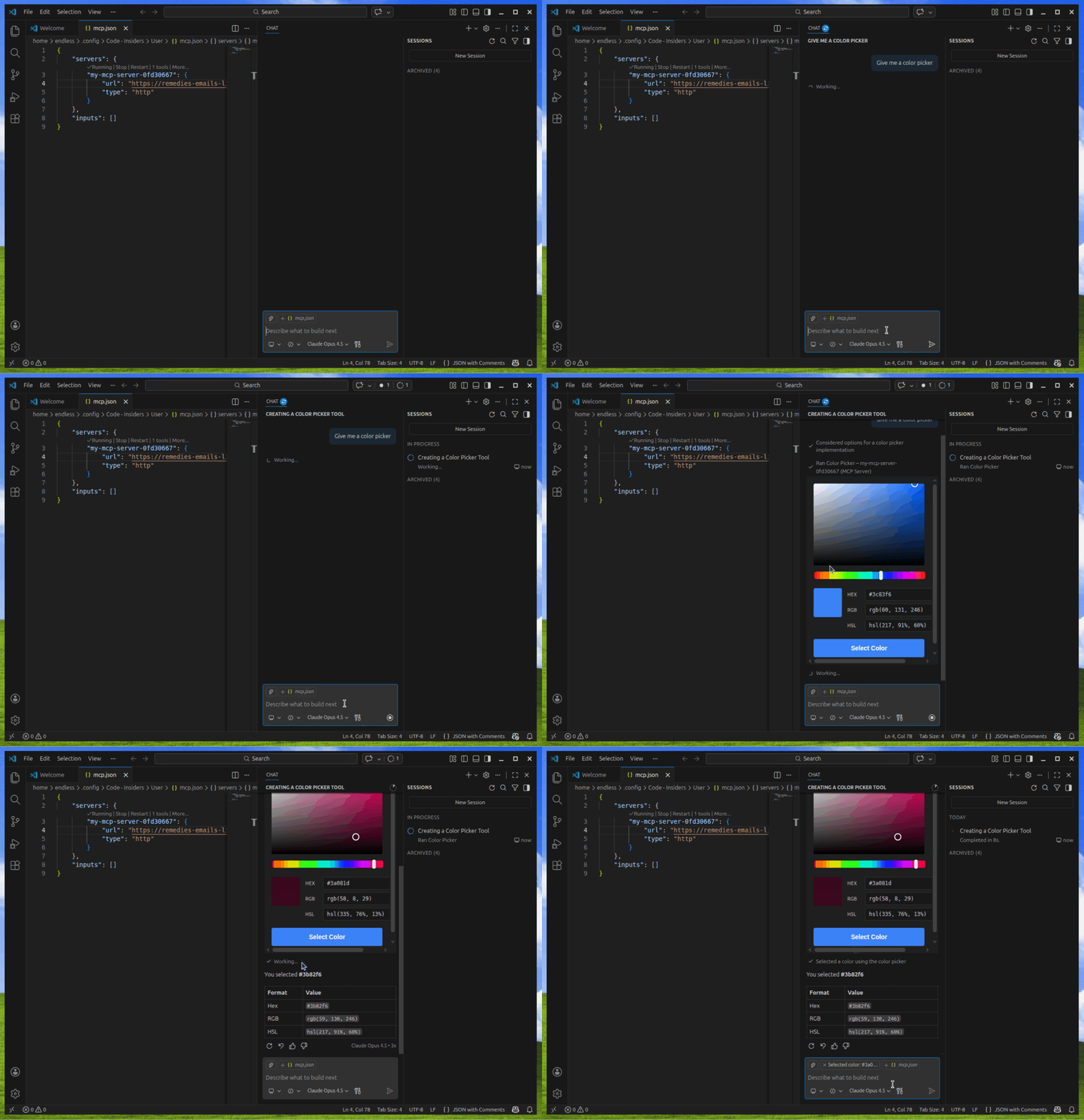
- Visual Studio Code - available in Visual Studio Code Insiders
- ChatGPT - starting this week
For the first time, an MCP tool developer can ship an interactive experience that works across a broad range of widely-adopted clients without writing a single line of client-specific code.
“I am excited about the possibilities that MCP Apps opens up. Having seen a glimpse of what is possible, I cannot wait to see what the community will build.”
- David Soria Parra, Co-Creator of MCP and Member of Technical Staff, Anthropic
“MCP Apps builds upon the foundations of MCP-UI and the ChatGPT Apps SDK to give people a rich visually interactive experience. We’re proud to support this new open standard and look forward to seeing what developers build with it as we grow the selection of apps available in ChatGPT.”
- Nick Cooper, Member of Technical Staff, OpenAI
“MCP Apps extends the Model Context Protocol in a way that puts humans at the center. The industry has embedded assistants into individual apps, creating fragmented, siloed experiences. MCP inverts this by making apps pluggable components within agents. MCP Apps extends this further by bringing user interfaces into the agent experience itself.
goose, the reference implementation for MCP, supports MCP Apps. Developers can now build interactive experiences that render directly in conversation: games, calendars, maps, checkout flows. At Block, we believe the future centers on users navigating through one trusted agent rather than context-switching between fragmented experiences, and MCP Apps supports that vision. We’re excited to support this standard and see where developers take it.”
- Andrew Harvard, Design Engineer, Agentic UX, Block
“As MCP evolves from ‘tools’ into a real platform for agentic work, VS Code has been treating the protocol like a contract: implement the full spec, track the latest transports and capabilities, and make sure server authors can rely on what they build actually behaving the same way for real developers. With MCP Apps, that contract finally includes the missing human step: when the workflow needs a decision, a selection, or exploration, the client can give you the right interaction without turning the conversation into a choose-your-own-adventure prompt.”
- Harald Kirschner, Principal Product Manager, VS Code, Microsoft
“The MCP Apps extension addresses a gap we have experienced first-hand: text and structured data only gets you so far when developers want rich, interactive tooling. The ability to render dynamic UIs directly from MCP servers, with security built in from day one, is exactly what we need to build better agentic experiences. JetBrains is excited to explore bringing this extension to our IDEs and continue working with the MCP Community.”
- Denis Shiryaev, Head of AI DevTools Ecosystem, JetBrains
“MCP Apps address a real gap between what agentic tools can provide and how users naturally want to interact with them. The ability to render dynamic interfaces directly in conversation makes it easier to leverage MCP server capabilities in practical ways. We’re excited to see this extension deliver richer interactions for users while enabling MCP server developers to craft experiences tailored to what they’re building. We’re excited to see how we can bring these capabilities to Kiro and the use cases it’ll unlock for our users.“
- Clare Liguori, Senior Principal Engineer, AWS
“The Antigravity team is excited to see the continued expansion of the MCP ecosystem, and will explore how MCP apps could enable new, magical experiences within Antigravity.”
- Anshul Ramachandran, Product Lead, Antigravity, Google DeepMind
This is just the starting lineup, and adding support to a new client is as easy as following the implementation guide.
Get Started
The ext-apps repository includes the SDK
and working examples:
threejs-server
for 3D visualization,
map-server
for interactive maps,
pdf-server
for document viewing,
system-monitor-server
for real-time dashboards,
sheet-music-server
for music notation, and
many more.
Pick one close to what you’re building and start from there!
Resources
- Documentation: MCP Apps Guide
- Quickstart: Getting Started with MCP Apps
- SDK:
@modelcontextprotocol/ext-apps - Examples: ext-apps repository
Claude.ai Feedback
If you’re building MCP Apps for Claude.ai and encounter issues with our implementation, please report them at github.com/anthropics/claude-ai-mcp. This helps us improve the experience for everyone.
ChatGPT Apps SDK Feedback
If you’re building apps with the ChatGPT Apps SDK and run into issues or have questions, please post in the ChatGPT Apps category on the OpenAI Community forum. This is where app developers, community moderators, and the OpenAI team actively engage to discuss builds, troubleshoot problems, and improve the overall developer experience.
Acknowledgements
MCP Apps is the result of collaboration across multiple teams and communities.
Ido Salomon and Liad Yosef created MCP-UI and moderated the #ui-wg channel,
incubating many of the patterns that MCP Apps now standardizes. Their work proved that
interactive UIs belong in MCP.
Nick Cooper at OpenAI helped deliver the OpenAI Apps SDK, enabling everyone to go beyond text in their interactions with Large Language Models.
Sean Strong, Olivier Chafik, Anton Pidkuiko, and Jerome Swannack from Anthropic helped steer the initiative from proposal to production.
The UI Community Working Group provided feedback through countless discussions, reviewed drafts, tested early implementations, and pushed for the right trade-offs between flexibility and security.
Thank you to everyone who contributed. Now go build something.